

Simply C2 · CRM standard feature

Tracking equipment installed base down to the site and the serial number

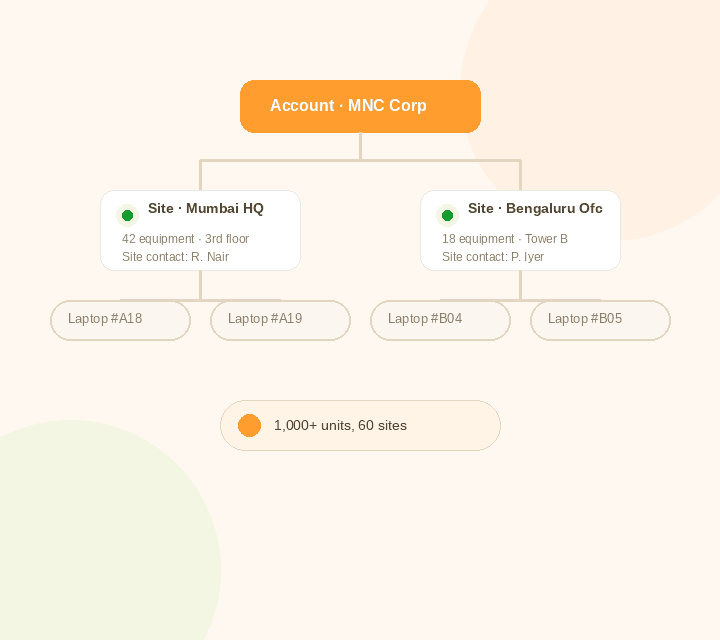
Every account can have many sites, and every site can hold many pieces of equipment. Simply C2 tracks that structure — with a site contact for every site, and a precise location for every visit — so nothing is ambiguous when a technician needs to get there.
  • Group Sites Under One Account
  • Tag a Site Contact for Every Location
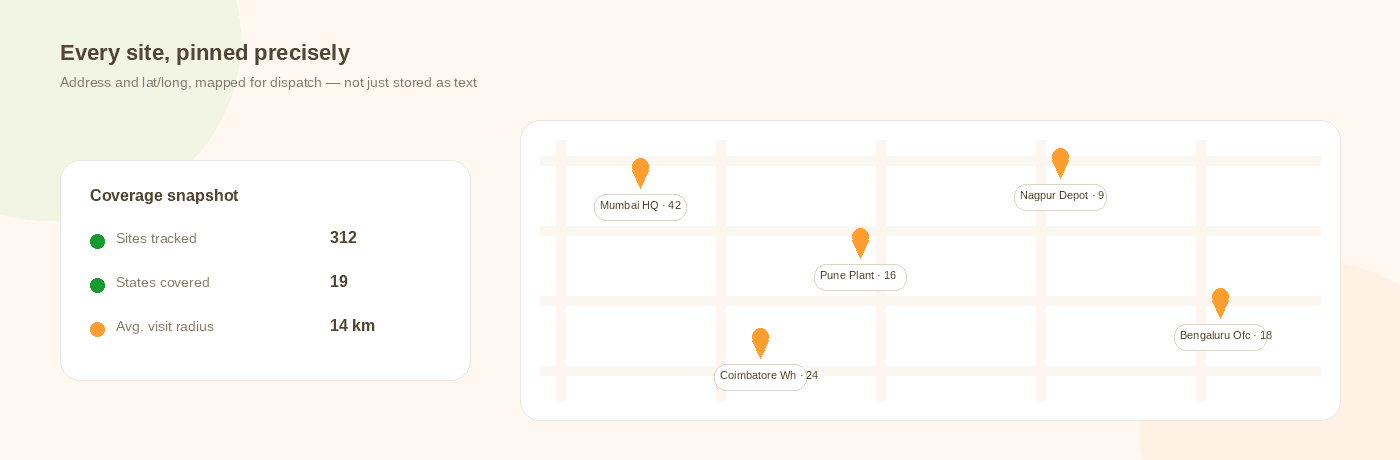
  • Map Every Site by Address and Lat/Long
  • Draw Insights From Years of Visit History
An account containing two sites, each with a site contact and a list of installed equipment

What breaks without structured installed-base tracking

  • One account can hide hundreds of sites.Sell a thousand laptops to one MNC and you don't have one installation — you have dozens of sites, sometimes several within the same office, each needing its own service history.
  • Nobody knows who to call at the site.Without a named site contact, a technician's first job on arrival is finding someone who can let them in and explain the problem.
  • A vague address costs a technician an hour.“Near the old water tank” isn't a location. Without an exact address and lat/long, dispatch and navigation both run on guesswork.
  • Equipment history gets lost when hardware turns over.Old equipment retires, new equipment replaces it at the same site — if that continuity isn't tracked, the site's service history resets with every swap.
  • Years of visit data go unused.Without a way to query it, a large service history is just a log, not the coverage, spares and performance picture it could be.
Inside the CRM

One record per site, per equipment

Every site carries its own address, its site contact, and the full list of equipment installed there — with the transaction and visit history following each one.

Try Simply C2 for free
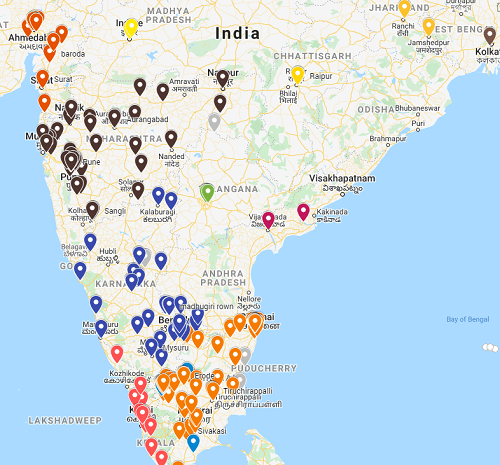
Map of installations across India: made possible by tracking equipment installed base
Sites plotted on a map with equipment counts, alongside a coverage snapshot of sites tracked, states covered and average visit radius
Simply C2 · Customer to Companies

The Simply C2 Platform
For Installed Base Tracking

YouYour customer
1

Your own web based Simply C2 CRM

  • Accounts, sites and equipment
  • Site contacts and territories
  • Canned reports and report builder
2

Simply C2 customer portal

  • Your verified customers get access
  • View their own sites and equipment
  • Raise a ticket against a site
3

Simply C2 mobile app for your technician

  • Navigate straight to the site pin
  • See equipment and visit history on arrival
  • Log the visit against the right site
4

Simply C2 mobile app for your customer

  • View their sites and equipment
  • Confirm the site contact
  • Track a technician's visit

Built around how your install base is actually structured

Group sites under one account

Sell to one account and install across many sites — even several within the same building — without losing the link back to who you sold to.

Tag a site contact

Assign who your service team coordinates with at each site, alongside your own site-level service owner, so nobody's chasing the wrong person.

Group into territories

Each site carries a designated service executive, which naturally groups sites into territories under a manager.

Customize with user-defined fields

Add the fields your business actually tracks at a site level, instead of working around a fixed schema.
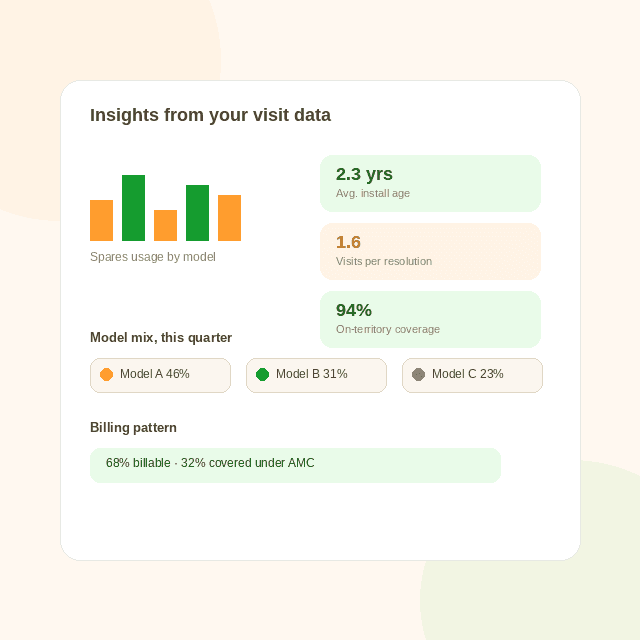
What tracking equipment installed base allows: Sample insights drawn from visit data: average install age, visits per resolution, on-territory coverage, model mix and billing pattern
Beyond record-keeping

Years of visits become a picture of your service business

Every visit you log against a site adds to a growing dataset. Over time, that turns into answers your team can actually act on — not just a history log.

  • Geographical coverageWhere your sites and technicians actually are, against where they should be.
  • Differential support needsWhich regions or site types generate disproportionately more tickets.
  • Spare parts usageWhich parts get consumed, where, and how often, by product and by site.
  • Technician effectivenessWho resolves issues in the fewest visits, and where repeat visits cluster.
  • Average install age and model mixWhat's ageing across your install base, and which models dominate it.
  • Billing patternsHow billable work splits from AMC-covered work, by site, region or account.

Simply C2 ships canned reports for most of these out of the box, plus a report builder for anything you want to slice differently.

Try Simply C2 for free

Put the site in your technician's hand

The Simply C2 mobile app navigates straight to the site pin and shows the equipment and history waiting there.

Get it on Google Play

FAQ

What is equipment installed base tracking?

It's recording where every piece of equipment under service is physically located — grouped by site, and sites grouped under an account — instead of holding equipment records with no structural link to where they sit or who to contact there.

How is a site different from an account?

An account is who you sold to — a company, for instance. A site is a physical location where equipment is actually installed. One account can have many sites, sometimes several within the same building.

What is a site contact?

The person your service team coordinates with at that location — separate from the site's own service owner on your side — so a technician always knows who to reach on arrival.

Can I see exactly where a site is, not just its address?

Yes. Sites are stored with both a physical address and latitude/longitude, so dispatch and navigation work off an exact location, not a text description.

Can I get reports on things like technician effectiveness or spares usage?

Yes. Simply C2 ships canned reports covering most common questions — coverage, spares usage, technician effectiveness, install age and model mix, billing patterns — and a report builder for anything you want to define yourself.

See your accounts, sites and equipment mapped the way they actually work.

Setup takes a call, not a sales pitch.

Try Simply C2 for free