

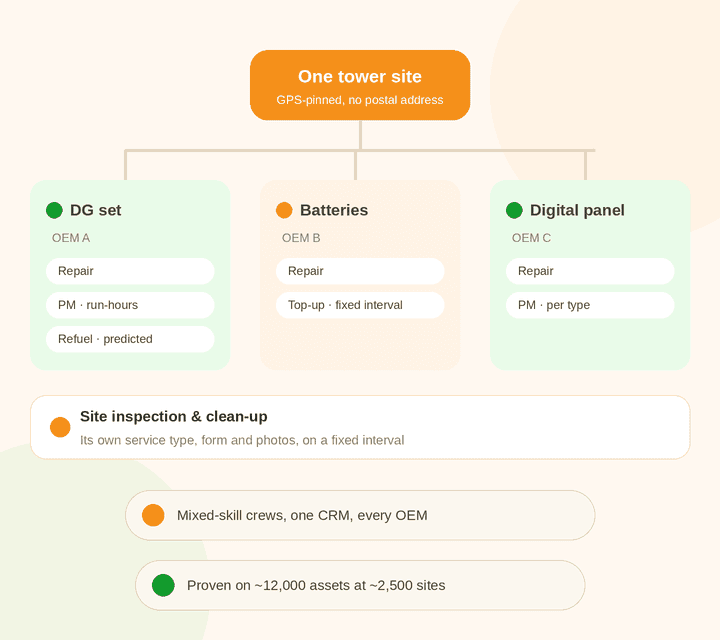
A tower site has a DG set from one maker, batteries from another and panels from a third. Each needs different work, on a different schedule, often by a different technician. Simply C2 runs all of it for a third-party maintenance (TPM) company, and we can get a team of 20 to 50 technicians live in one to two weeks.
Most service CRMs are built for an OEM servicing its own products. A TPM company has four problems an OEM doesn’t. See how Simply C2 handles third-party maintenance.
Every asset needs its own make, model, serial number, specs and history, whoever built it. Simply C2 organises them by category, product and sub-product.
A DG set needs repair, PM and refuelling. A battery bank needs top-ups. The site itself needs inspection and cleaning. Each is its own ticket type with its own form.
Some work runs on a fixed calendar. Some depends on run-hours or fuel use. One engine has to handle both, per equipment type.
Your client plans replacement and obsolescence from your service data. If the data isn’t captured at every visit, you can’t report it.
On the tower network, refuelling DG sets and topping up batteries needed little or no technical skill. Repairing a DG set or a digital panel needed trained technicians, each with a different skill set.
Simply C2 mapped each technician to the product categories and kinds of work they handle. Low-skill jobs went to field staff, and repair calls went only to technicians qualified for that equipment. Skilled technicians spent their time on skilled work. For a home-appliance service team, the same setup means a fridge technician never gets sent to an AC call. Category mapping is a paid customisation, quoted for your setup.
| Job | Skill needed | Goes to |
|---|---|---|
| DG refuel | Low | Field staff |
| Battery top-up | Low | Field staff |
| Site inspection and clean-up | Low | Site crew |
| DG repair and PM | High | Technicians mapped to DG sets |
| Digital panel repair | High | Technicians mapped to panels |
A TPM setup looks complicated: many equipment types, many service types, many schedules. Most of it is configuration, and we do it with you.
Book a setup callWe list your clients, sites, equipment types, the services each contract covers, and the SLAs you owe.
Site lists, equipment by make and serial number, and contract dates, from your Excel sheets or current software. You check it, then we load it.
Repair, PM, refuel, top-up, and your own types such as site inspection, each with its own checklist and trigger.
One named person works with you from the kickoff call until your technicians are closing tickets on the app.
Our customer here is itself a third-party maintenance company. A large mobile network operator contracted it to maintain the equipment at its tower sites, under strict SLAs.
~2,500
telecom tower sites across four states
~12,000
pieces of equipment under maintenance
150
technicians working on the mobile app
~600
tickets a day, logged 24/7
The equipment at each site included DG sets, batteries, digital panels and other electrical equipment. The contract covered repair, PM, DG refuelling, battery top-ups, and site inspection and clean-up.
Each equipment type needed different service steps and different data captured. Each kind of work ran on a different schedule. All of it had to meet the SLAs in the operator’s contract.
| What | Unplanned work | Scheduled work | What sets the schedule |
|---|---|---|---|
| DG sets | Repair, logged 24/7 | PM and refuel | Run-hours and fuel level recorded at each visit |
| Batteries | Repair, logged 24/7 | Top-up | A fixed interval |
| Digital panels and other electricals | Repair, logged 24/7 | PM | Set per equipment type |
| The site itself | – | Inspection and clean-up | A fixed interval |
We kept the core product intact and made only minimal changes. The rest was configuration, which is why the same setup can go live quickly for a smaller TPM team.
All equipment went into the database by serial number, with specifications for each equipment type. Sites were mapped by GPS, because many towers are remote and have no proper postal address. See installed base tracking.
At your size: your clients’ sites and every asset on them, whichever OEM made it.
Breakdowns could be logged at any hour through the customer portal and app. Tickets went automatically to the engineer for that territory, and could be reassigned if he was absent or overloaded. See repair service management.
At your size: a 2am breakdown call reaches the technician for that cluster.
Site inspection and clean-up were set up as their own service types, with their own forms, alongside repair, PM, refuel and battery top-up. See scheduled maintenance tickets.
At your size: any recurring job your contract lists becomes a ticket type, with its own checklist.
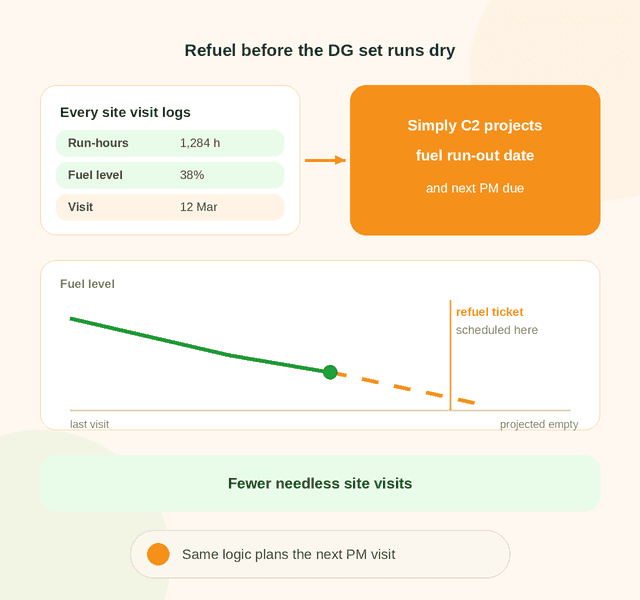
Site cleaning, inspection and battery top-ups ran at fixed intervals. PM and refuelling ran on dynamic intervals, driven by wear and by fuel consumption from run-hours. Each schedule was set per equipment type.
At your size: the rules are set once per equipment type and apply to every site.
At every site visit, the technician logged run-hours on all electromechanical equipment and the fuel level in the DG set. From those readings, Simply C2 calculated when the next refuel and the next PM visit were due.
That cut down needless trips to remote sites, saving time and money. It works the same way whether you look after 2,500 towers or 150.
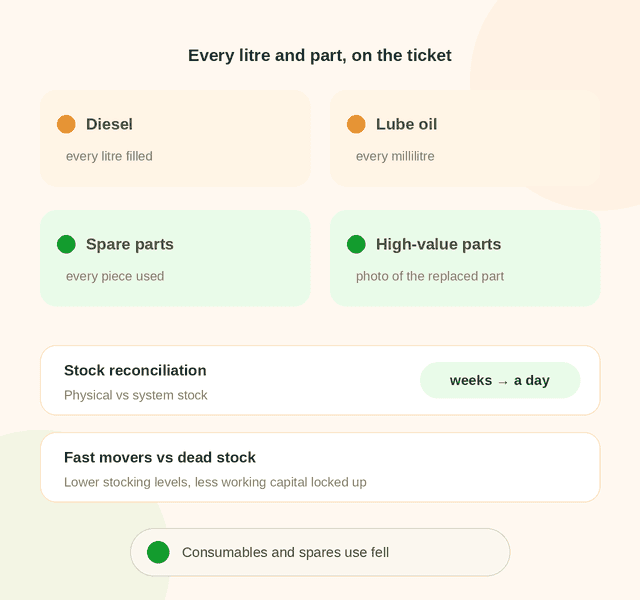
Every spare part used was logged, along with every litre of fuel and every millilitre of lube oil. For high-value items, technicians had to photograph the part they replaced.
Reconciling physical stock against system stock used to take weeks. Now it takes a day. With data on fast-moving and non-moving parts, the company cut stocking levels and freed up working capital. See spare parts usage tracking.
Management could see which equipment broke down often, with each asset’s full history and each site’s repair record. That data was captured on regular visits and fed the operator’s replacement planning. See customer service insights.
Scheduled maintenance cut breakdowns, overhauls and periodic services were easier to plan, and spares consumption fell steadily.
With technicians mapped to categories and job types, refuels and top-ups went to field staff, and DG and panel repairs went to the technicians trained for them.
With territories mapped to technicians and managers, tickets were assigned automatically as they were logged. The technician was notified, and the customer got an acknowledgement with the technician’s contact details. See field service location tracking.
You don’t need 2,500 towers to have these problems. Any TPM contract with more than one OEM and more than one kind of work has them from day one.
Talk to our team| Lesson | On the tower network | In your TPM business |
|---|---|---|
| One register for every OEM | ~12,000 assets across equipment types | Every client asset, whoever made it, with its own history |
| A ticket type per job | Repair, PM, refuel, top-up, inspection and clean-up | Whatever your contract lists, each with its own form |
| Schedules from real readings | Refuel and PM planned from run-hours and fuel level | Fewer wasted visits to far-off sites |
| The right skill on each call | Low-skill refuel and top-up jobs kept apart from skilled DG and panel repairs | Technicians mapped to product categories and job types, so each call reaches the right person |
| Account for every consumable | Fuel, lube oil and parts on the ticket | No unexplained diesel or spares bills |
| Data your client asks for | Health reports for obsolescence planning | The reports your client asks for, captured at every visit |
Your technicians get assignments, directions, checklists and reading forms on the Simply C2 CRM app, and log geo-tagged photos and visit details at the site. In the case study, all 150 of them worked this way.

Yes. The company in this case study is a third-party maintenance provider running telecom tower maintenance for a mobile operator, across DG sets, batteries, digital panels and other electrical equipment, with repair, PM, refuel, battery top-up and site inspection work.
Yes. Each asset is its own record with its own make, model, serial number, specifications and history. See third-party maintenance software.
Yes. Site inspection and clean-up were set up as their own service types in this case study, each with its own form, alongside repair, PM, refuel and battery top-up.
At each visit the technician logs the DG set’s run-hours and fuel level. Simply C2 uses these readings to work out when the next refuel is due, and the same readings drive the next PM date.
Yes. In this case study, technicians were mapped to the product categories and kinds of work they handle. Low-skill jobs like refuelling and battery top-ups went to field staff, and DG and panel repairs went only to technicians qualified for that equipment. Technician-to-category mapping is a paid customisation, quoted separately.
Yes. Response times can be set per product within one customer contract. See third-party maintenance software.
For a team of 20 to 50 technicians, one to two weeks, including data migration and onboarding, which are free for paid customers. The Premium plan, which includes preventive maintenance and spare parts logistics, is ₹5,000 per user per year, billed for every user. The Starter plan is free for up to 10 users. Custom dashboards and reports built by our team, and customisations such as technician-to-category mapping, are quoted separately. See license pricing.
We migrate your site and asset data, set up your service types, and a named lead takes you through go-live.