

Customers search the Simply C2 brand directory for who to call and who to escalate to. If you run Simply C2 CRM, the complaint they start there lands in your CRM, not in an inbox or a chat nobody owns.
Have a complaint to make? Find your brand in the directory.
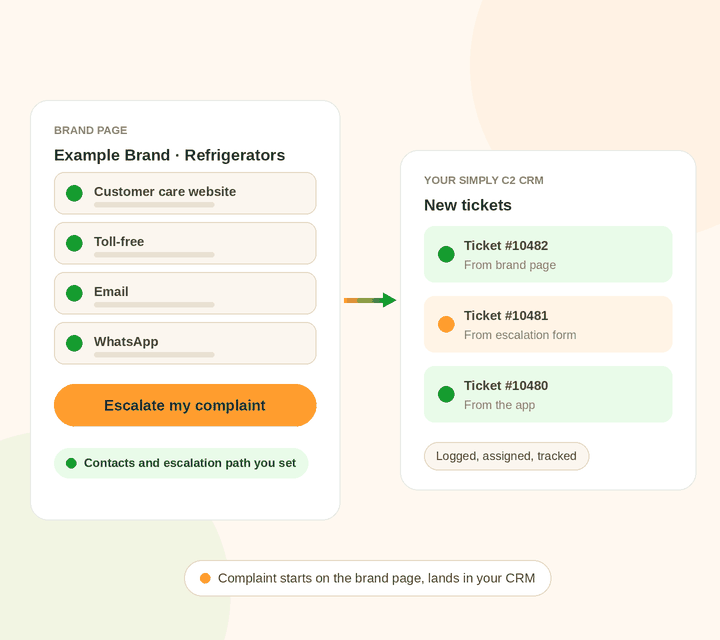
The Simply C2 brand directory lists customer care and escalation contacts for 140+ brands across India. Customers search by brand, product or category and land on your page.
How changes work. This isn’t a self-serve editor today. You send us what to change, we go through the wording with you, and we publish it.
Browse the directory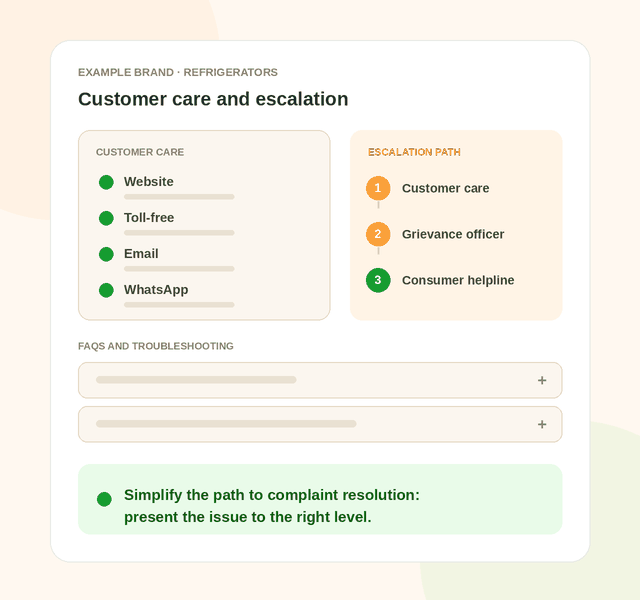
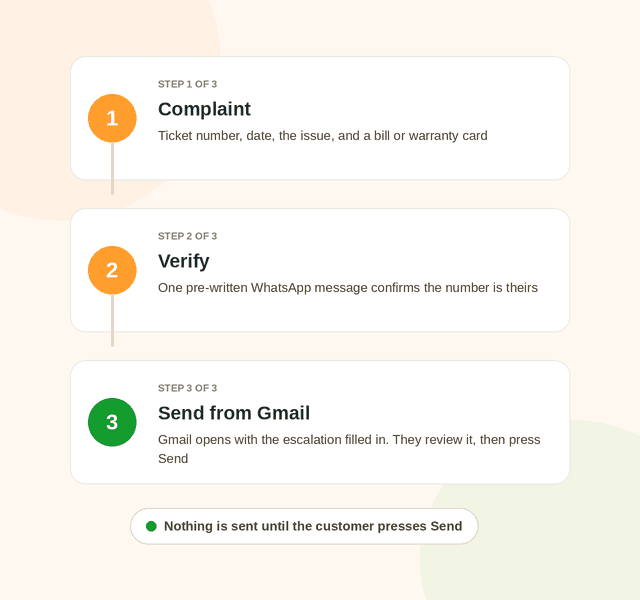
On the escalation page a customer enters the brand’s ticket number and date and describes what is unresolved. Simply C2 reads the bill or warranty card they attach to prefill the model, serial number and purchase and warranty dates.
The complaint reaches a named contact at the brand, not a general inbox. The email is structured: key case facts, a summary of the issue and the action required, so the brand gets a case it can act on, not a one-line complaint.
Connect your brand pages to your Simply C2 CRM and a customer can click to complain on your page. The ticket is created in your CRM, ready to assign. Escalations and app complaints arrive the same way.
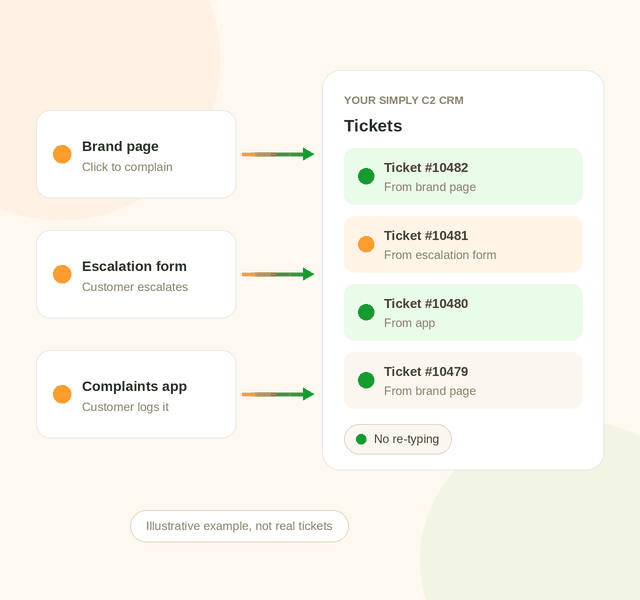
Your page helps customers either way. What changes is whether you can see the complaint.
The customer finds your contacts and starts a WhatsApp message, an email or a call. Simply C2 can’t see what was sent, or whether you acknowledged it. An escalation is an email the customer sends from their own Gmail.
Click to complain on your page creates the ticket in your CRM. Escalations from the escalation page land there too, and so do complaints from the app. This is live today for Simply C2 CRM customers.
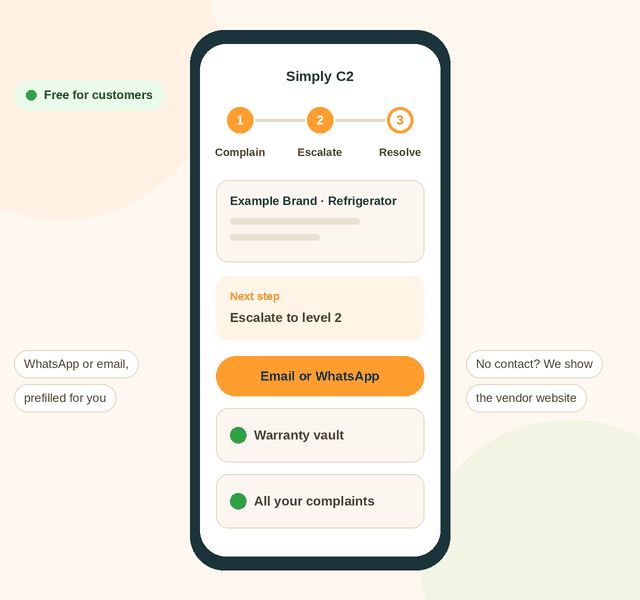
Starting from scratch? The free Simply C2 complaints app takes your customer from complaint to resolution: log it once, get told when and where to escalate next, and track it until it is closed.
The app prefills a WhatsApp message or an email to the vendor. If neither is available, it shows the vendor’s website so the customer can log the complaint there. For vendors on Simply C2 CRM, the complaint goes straight into the CRM. See our guide to mobile apps for service teams.

Subscribe to Simply C2 CRM and the complaint doesn’t stop at your inbox. It runs from logging to assignment to tracking to closure on one system, and your customer sees it move.
Complaints arrive from your brand page, the escalation page, the app or WhatsApp, as tickets in your CRM.
Tickets go to the right person: by territory for field service, or by branch and service manager for a service centre.
Customers see progress on the app, chat with your team and see when the technician is coming. Every stage is time-stamped.
The work is closed against the ticket, with the visit, parts and history on record, and the customer is told.
Set it up for technicians on the road with field service management software, or for the repair bench with service centre automation. Both run on the same CRM and both keep the customer informed at each stage. For the wider picture, see the Simply C2 customer service platform and our guide to automated customer messaging.
Repair tickets, warranty and AMC tracking, the installed base, messaging, the technician app and location tracking. Brand page control and the CRM connection are ₹20,000 a year, paid in advance, for your whole company however many brands you run.
Brand page control and the CRM connection are included. Premium also adds preventive maintenance, spare parts logistics, repair estimates, invoicing, two-way WhatsApp messaging and advanced reports. Data migration and onboarding are free for paid customers.
Your customers use the complaints app free, and can log complaints on WhatsApp, on every plan. See license pricing.
A place where customers find a company’s support contacts, log or escalate a complaint, and where the company receives it. At Simply C2 that is the brand directory, the escalation page and the complaints app, connected to Simply C2 CRM.
Not today. It isn’t a self-serve editor. You send us the changes to your contacts, escalation path or FAQs, we go through the content with you, and we publish it.
If your brand pages are connected to your Simply C2 CRM, a customer can click to complain on your page and the complaint is created in your CRM. Escalations from the escalation page and complaints from the app arrive the same way.
Customers can still find your contacts, start a WhatsApp message, an email or a call, and escalate by email. Simply C2 can’t see what was sent or whether you acknowledged it. If you run another CRM, talk to us about a connection.
Premium includes brand page control and the CRM connection. On Starter it is ₹20,000 a year, paid in advance, for your whole company, however many brands you run.
Customers don’t pay. The complaints app is free, and the escalation page asks them to verify their WhatsApp number with one message.
Tell us what your page should say. We’ll show you how complaints reach your CRM.
Talk to our team