

Every part priced from your own price list, every line visible to the customer, and nothing repaired until they approve. When the job closes, Simply C2 turns the approved estimate into a taxed invoice.
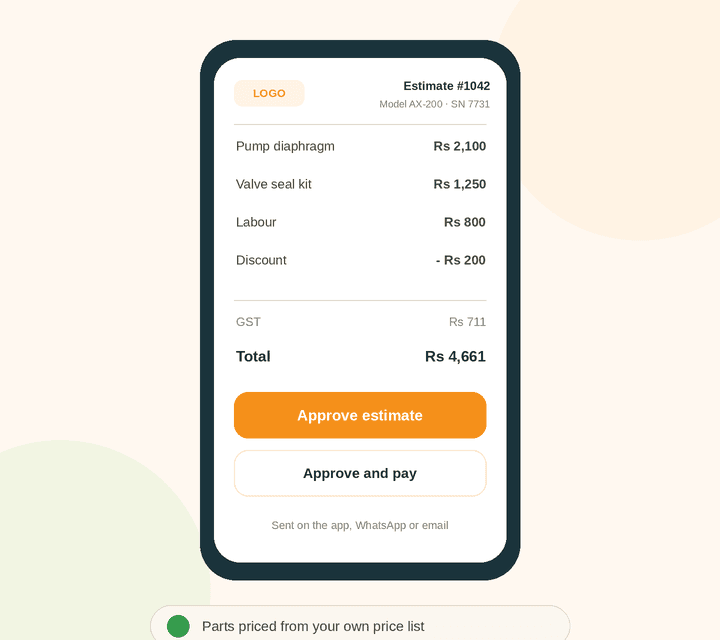
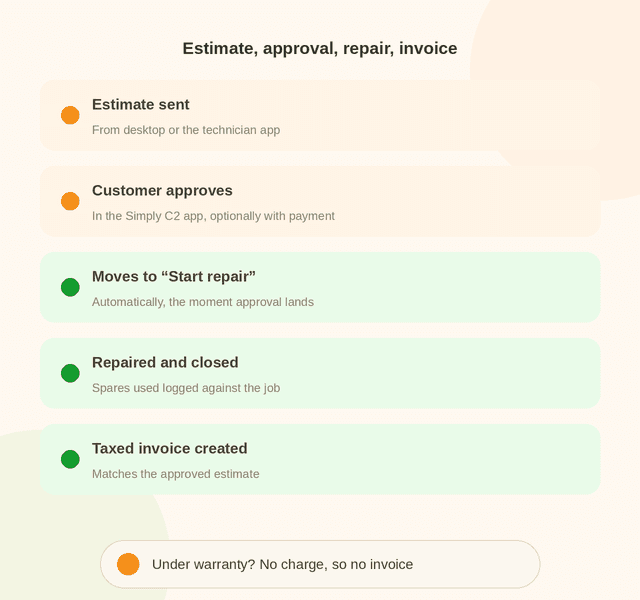
From the desktop or the technician app, on site or at the bench, using a ready template with your logo and address.
In their Simply C2 app, and if you choose, they pay against the estimate straight to your account.
The ticket moves to “Start repair” as soon as approval comes in. No one has to chase it.
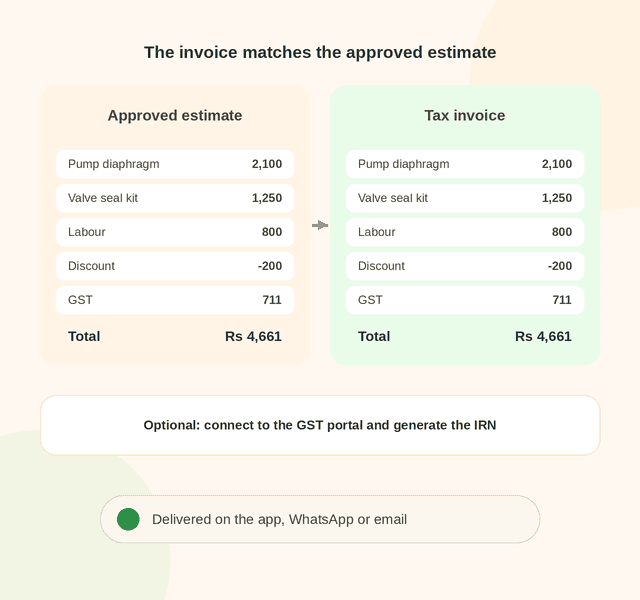
When the ticket closes, a taxed invoice is created from the approved estimate.
Store every spare part with its description and price, linked to the right model numbers, so the wrong part can’t be quoted. See spare parts usage tracking.
Raise estimates from the desktop CRM or the technician’s mobile app, with room for your team to apply discounts.
If a repair is under warranty and carries no charge, no invoice is raised. See warranty and AMC tracking.
Estimates, approvals and invoices travel in the app, on WhatsApp or by email, whichever the customer uses.
Let customers pay against the estimate directly to your account, or record payments taken offline. Your choice.
Taxed invoices at closure, with the option to connect to the GST portal and generate the IRN.
No re-typing, no surprises. The invoice carries the same lines, discount and tax as the approved estimate, and goes to the customer on the app, WhatsApp or email.
In the petrol pump deployment, itemized estimates and coverage checks meant no free service by mistake and no unbilled work.
At a water treatment manufacturer’s 10 service centres, with revenue realisation up 35%. Read the case study.
At a 35,000-genset service operation, itemized repair estimates led to transparency and customer trust. Read the case study.
Across ~60 tanker truck depots, drivers received itemized estimates on WhatsApp before any work. Read the case study.
Itemized estimates work the same way whether your technician is at the customer’s site or your service centre. See field service automation and service centre automation, or how it all connects to your customers on the Simply C2 customer service platform.
Technicians raise itemized estimates from the Simply C2 CRM app.

A quote that lists each part, labour charge, discount and tax separately, so the customer can see exactly what they’re paying for before approving the repair.
Yes. Estimates can be raised from the desktop CRM or the technician app, using your price list and template.
Yes. The ticket moves to “Start repair” automatically when the customer approves in the Simply C2 app.
Optionally, yes: directly to your account. You can also record payments taken offline.
Simply C2 creates taxed invoices when the ticket closes, and can optionally connect to the GST portal to generate the IRN.
Repair estimates and invoicing are on the Premium plan, at ₹5,000 per user per year. The Starter plan is free for up to 10 users and covers repair tickets and warranty tracking. See license pricing.
Itemized repair estimates are part of Simply C2 Premium.