

What is the need for self-service complaint logging?
Because, most customer complaints do not arrive between ten and six. For example, the washing machine that stops on a Sunday; a charger fails late at night. If your only way to log a complaint is to phone a desk, the complaint waits until someone is at it, and the customer’s first impression of your service is a ringing phone.
What “24/7 logging” means, and what it does not
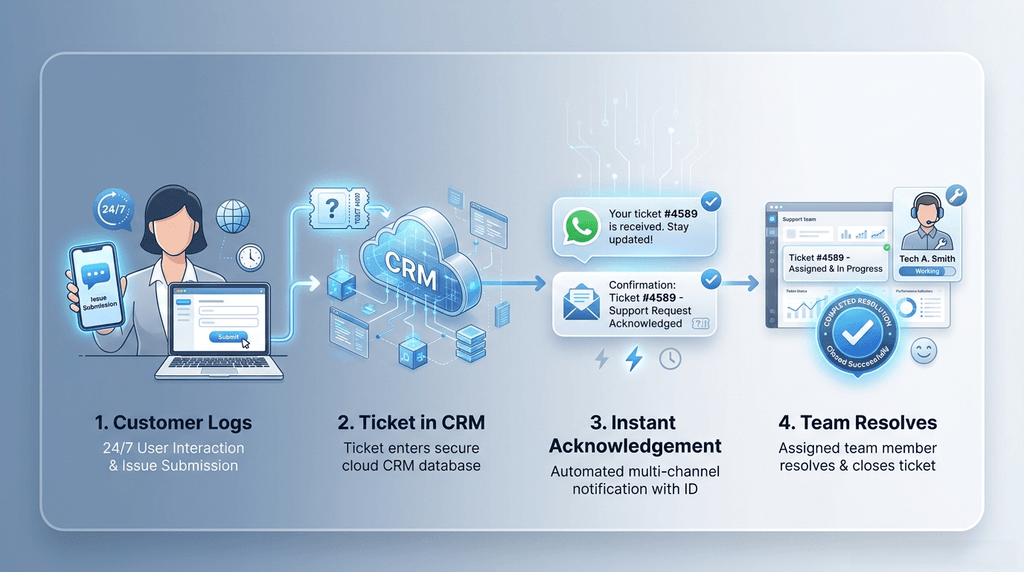
24/7 self-service complaint logging means a customer can record a complaint at any hour. It does not mean someone is awake resolving it. For a brand connected to Simply C2 CRM, the flow is:
- The customer logs the complaint on your brand page, or in the free Simply C2 complaints app (Android).
- A ticket is created in your Simply C2 CRM.
- The customer receives an acknowledgement on WhatsApp and email, with the ticket reference.
- Your team picks it up in working hours, assigns it, and resolves it.
Nobody has to answer a phone for steps 1-3. People are still needed for step 4.
What the customer can do in the app
- Describe the problem and attach a photo, so the technician sees it before the visit.
- Follow the status and get a push notification when it changes.
- Approve a repair quotation digitally, if your brand is connected to Simply C2 CRM.
- Use the app in English, Hindi, Bengali, Tamil, Kannada or Gujarati. And, chat with the customer service in any language. It is machine-translated, which helps a customer and a technician who do not share a language. Imagine you sold a machine in Brazil and the customer wants to chat with your service team in Portugese. He can, now, through this bi-directional translation.
- The app is on Android today. Customers on other phones can log a complaint from the browser on your brand page in the directory.
What changes for your team
- Fewer calls that exist only to log a complaint: Your people spend their time on resolving, not on taking down details.
- A complete record from the first moment: The ticket has the date, time and the customer’s own description, often with a photo.
- Less repetition: The customer does not need to explain again when someone calls back.
- Quotations approved without paper: The customer approves in the app and the approval reaches the ticket.
- A trail of the visit: The technician’s activities are time and location tagged. So “was anyone there?” has an answer.
What does not change
- Complaints still have to be resolved by your technicians and service staff.
- A faster front door makes slow back-end work more visible. If assignment takes days, the customer will see the acknowledgement and then wait. Logging is a promise to look; the resolution is what counts.
- If your brand is not connected to a Simply C2 CRM, customers can find your contacts but Simply C2 cannot create the ticket for you.
- Photos are supported; video is not.
Does this replace a call centre?
It reduces the calls that exist only to log a complaint. It does not remove the need for people to answer questions or handle difficult cases. We cover that trade-off in call centre overhead and why customers expect a self-service portal.
Setting it up
Set-up is from menus and takes about ten minutes. Free for up to 10 users, no credit card; see pricing. The customer-facing side (portal and app) is always free for your customers. Read how the whole thing fits together on the customer complaint portal page, and what customers see in the complaints app.
See complaints arrive in your own CRM – Start Free!
Leave a Reply