

An escalation matrix says who a problem goes to next, and when, if the first person has not solved it. Below: what it is, the columns to include, a sample you can copy, and a free Excel template.
Have a complaint with a brand? Find the brand's escalation contacts in the directory.
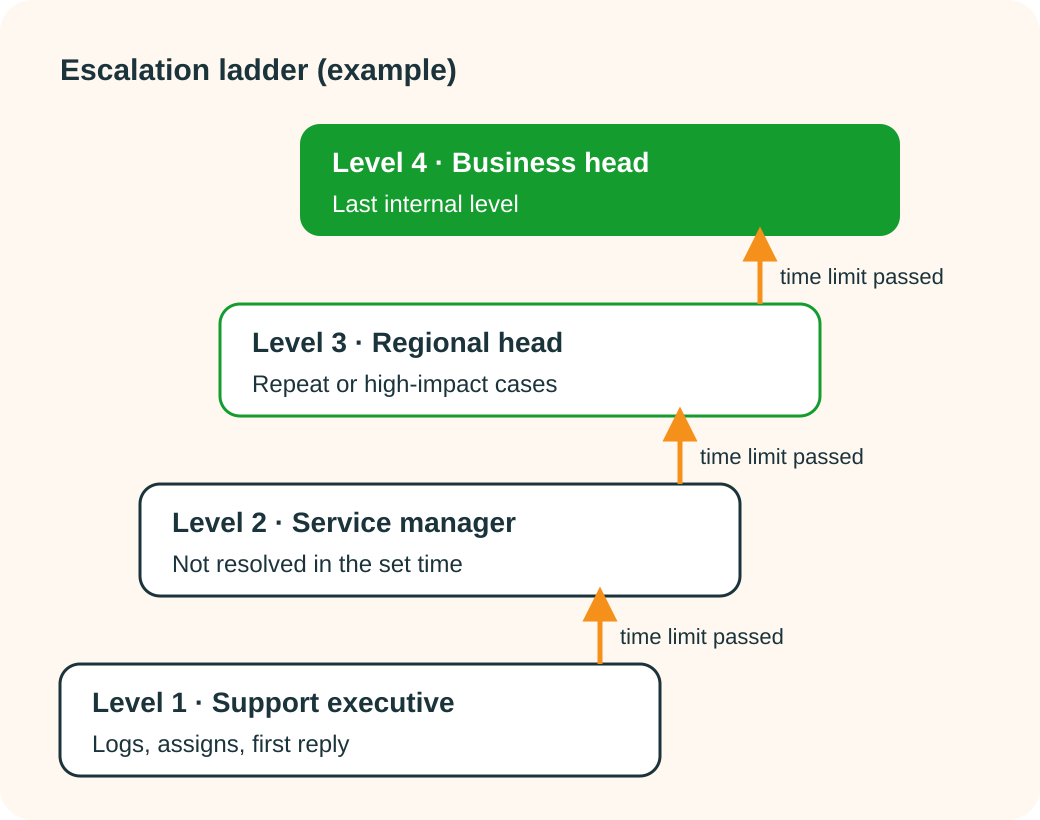
An escalation matrix is a table that lists, level by level, who handles a problem, how to reach them, and how long they have before it moves to the next person. It is used in customer service, IT support, after-sales service and project delivery.
The idea is simple. Most issues are solved at the first level. The ones that are not should not depend on the customer knowing whom to chase. When the time limit at one level passes, the matrix tells everyone, inside and outside the company, who owns the issue next.
The same table is sometimes called an escalation matrix format, an escalation hierarchy or an escalation ladder. They all mean the same thing.
One row per level. These columns are enough for most service teams:
L1, L2, L3, L4. Keep it to four. More levels slow the issue down.
The role first, because names change. Add the current name next to it.
Phone, email and, if used, WhatsApp. Use a shared mailbox for each level so a leave day does not block it.
What this level can decide: replace a part, approve a goodwill visit, waive a charge.
How long the issue can stay at this level before it moves up. Set it in hours or working days, and write down when the clock starts.
What moves it up besides time: a repeat failure, a safety issue, a customer asking for a manager.
Optional columns: backup person, working hours, and the person to copy on the email.
This is an example with invented roles, addresses and time limits. Replace them with your own. It shows the shape, not a recommended number of hours.
| Level | Role | Contact (example) | Handles | Moves up if |
|---|---|---|---|---|
| L1 | Support executive | support@example.com | Logs the complaint, assigns a technician, first reply | Not resolved within the L1 time limit (example: 2 working days) |
| L2 | Service manager (city) | servicemanager@example.com | Reassigns, approves a second visit, orders a part | Not resolved within the L2 limit (example: 2 more working days), or a repeat visit for the same fault |
| L3 | Regional service head | regionalhead@example.com | Approves a replacement or a refund route, reviews the case | Not resolved within the L3 limit (example: 3 more working days), or a safety issue |
| L4 | Business head / customer care head | carehead@example.com | Final internal decision | Last internal level. The customer is told what other routes exist. |
Example only. Names and addresses are invented. Set your own time limits to match your service promise.
Many brands publish their escalation contacts, but they are often buried in a warranty booklet or a footer link. The Simply C2 brand directory collects support contacts and the escalation path for brands in one place. Not every brand has every level listed, and smaller brands may have only one or two.
If you already have a ticket number and the brand has gone quiet, the free complaint escalation service helps you prepare the escalation email. You review it and send it yourself; Simply C2 does not send anything on your behalf and does not take sides.
A table in a PDF does not move an issue up. Someone has to notice the time limit has passed. In a spreadsheet that is a person scanning rows. In a service CRM the complaint is a ticket with an owner and a status, so the list of tickets past their limit is a filter, not a search.
If your brand is connected to Simply C2 CRM, a complaint a customer logs on your brand page or in the free app is created as a ticket in your CRM. Your published escalation path sits on the same brand page. Setting this up is covered on the customer complaint portal page. If your complaints still live in a spreadsheet, start with the complaint register format or read when to move from Excel to complaint management software.
A table that lists who handles an issue at each level, how to contact them, and how long each level has before the issue moves to the next one.
In customer service it is the published path a complaint follows when the first contact does not resolve it: support executive, then manager, then regional or business head, each with a time limit.
One row per level with columns for level, role and name, contact details, what that level can decide, the time limit and the trigger that moves the issue up. A sample is on this page.
Three or four is usual. Each level should be able to decide something the one below cannot. More levels add delay without adding authority.
Yes. Download the Excel template from this page. It has the columns above, a filled sample row to replace, and a sheet that explains each column. It also opens in Google Sheets.
Roles that can make a decision at that level, not just people who are senior. Add a backup for each role so the path works when someone is on leave.
The matrix says whom to write to and when. The email is the message you send. See how to write an escalation email.
Check the brand's support or grievance page, the warranty card and the original ticket confirmation. The Simply C2 brand directory also lists escalation contacts where they are known; not every brand publishes every level.
Free Starter plan for up to 10 users, no credit card. Complaints from your brand page become tickets in your CRM.
Start free