

A PM schedule answers three questions: what is due, when, and what has already been missed. Below: what to put in it, how to choose the trigger for each piece of equipment, a sample, and a free Excel template that works out due dates and flags what is overdue.
A preventive maintenance (PM) schedule is a list of the equipment you look after, how often each item needs servicing, when it was last done and when it is next due. Servicing on a schedule is meant to catch wear before it becomes a breakdown, so a visit is planned instead of an emergency.
It is not the same as the PM checklist. The schedule says when a piece of equipment is serviced; the checklist says what the technician checks on that visit. You need both, and each type of equipment needs its own checklist. See equipment maintenance checklists.
Asset ID, name, location and category. Give every item one ID and never reuse it. The ID is what links a visit in the log to the schedule.
Calendar (every N months) or run-hours (every N hours of running). Pick the one that matches how the equipment wears. More on this below.
Months or hours between services. Take it from the manufacturer's manual and your own experience; this template does not recommend intervals.
Date of the last PM and, for run-hours equipment, the meter reading then. Without it the next due date cannot be worked out.
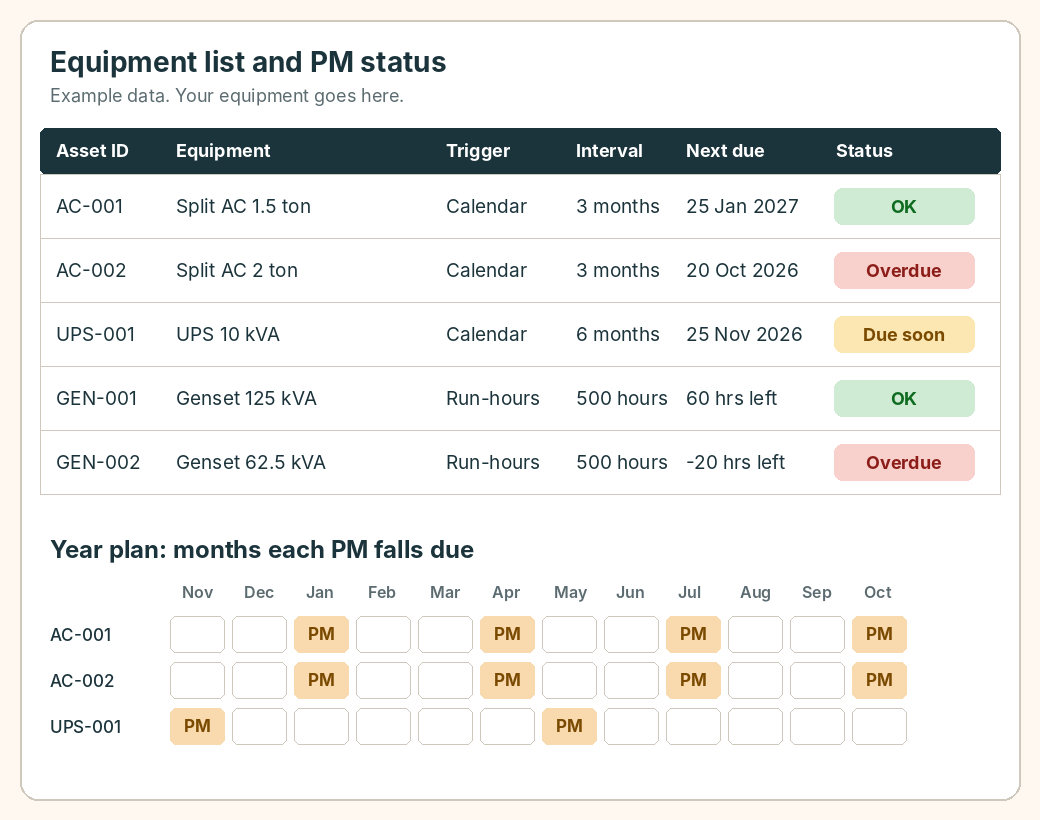
Calculated: next due date or hours left, then Overdue, Due soon or OK. This is the column you read every morning.
The person or team responsible, so an overdue item has a name beside it.
Invented equipment and intervals, to show how the sheet reads. Use your own manuals for real intervals.
| Asset ID | Equipment | Trigger | Interval | Last PM | Next due |
|---|---|---|---|---|---|
| AC-001 | Split AC 1.5 ton | Calendar | 3 months | 25 Oct 2026 | 25 Jan 2027 |
| UPS-001 | UPS 10 kVA | Calendar | 6 months | 25 May 2026 | 25 Nov 2026 |
| GEN-001 | Genset 125 kVA | Run-hours | 500 hours | at 1,200 hours | at 1,700 hours (meter now 1,640: 60 left) |
Example only. Names, dates and intervals are invented.
A spreadsheet is a sound start for a few dozen items and one person who reads it. It strains when the list grows, when several people edit it, and when the reminder only works if someone remembers to open the file.
In scheduled maintenance tickets the schedule is a rule, set once against a product category by calendar, run-hours or event. When a ticket is closed the next one is created, and technicians see it on their phones with the checklist for that equipment. Preventive maintenance scheduling is on Premium: ₹500 per user per month, or ₹5,000 per user per year if paid annually; Starter is free for up to 10 users. If the PM schedule belongs to a wider contract, see AMC management software, and for the whole picture field service management software.
A list of the equipment you maintain, how often each item needs servicing, when it was last done and when it is next due. It turns servicing into planned visits instead of reactions to breakdowns.
List each piece of equipment with an ID, choose a trigger (calendar or run-hours) and an interval, record the last service, and calculate the next due date as last service plus the interval. Then add a status that shows Overdue, Due soon or OK. The free template on this page does all of that.
The schedule says when each item is serviced. The checklist says what the technician checks on that visit. Each type of equipment needs its own checklist.
Use run-hours for equipment that wears with use, such as generator sets and pumps, and the calendar for equipment that ages with time or must be checked by a fixed date. Where the manufacturer gives both, follow whichever comes first.
Start with the manufacturer's manual for each item, then adjust with your own experience of faults and conditions. This template does not suggest intervals because they differ by equipment and use.
Yes. Download it from this page. It has an equipment list with due dates and status, a PM log, a 12-month plan and a settings sheet. It also opens in Google Sheets.
When the list is too long for one person to scan, when several people need to edit it, or when reminders fail because nobody opened the file. Software creates the next scheduled job when one closes and shows it on the technician's phone.
Free Starter plan for up to 10 users, no credit card. Scheduling rules are on Premium.
Start free