

A job sheet is the one page that follows a product through your service centre: what came in, what was promised, what was done and what went back. Below: the fields to include, a sample, and a free Excel template you can print today.
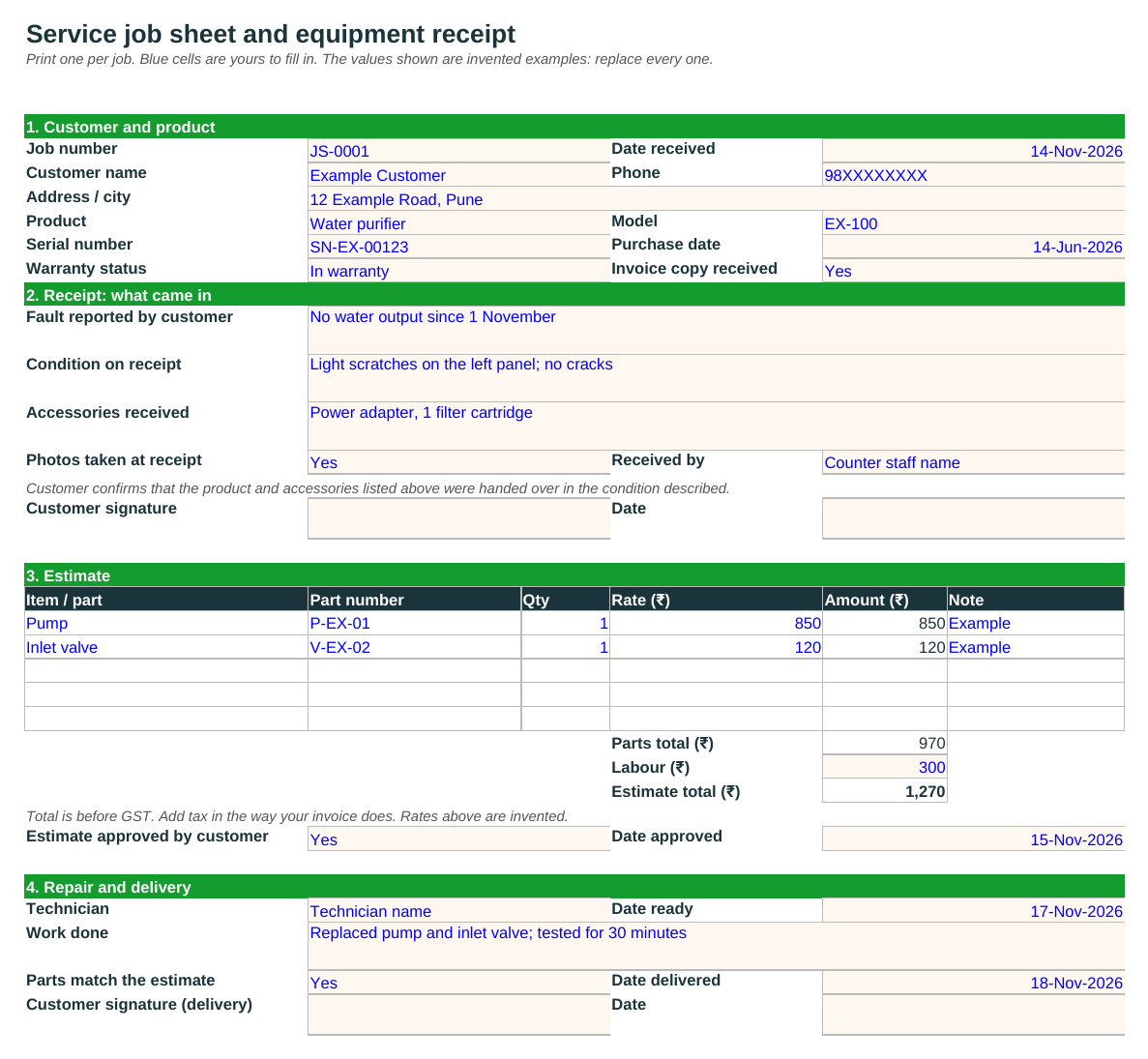
A service job sheet is a form filled in when a product comes to a service centre for repair. It records who the customer is, what product it is, what was wrong, what condition it arrived in, what the repair will cost, and when it went back. One sheet per job, kept with the product.
It protects both sides. The customer has a record of what was handed over. The centre has a record of the condition on arrival, which settles most arguments about scratches, missing accessories and promised charges.
You will also hear it called a job card, a repair job sheet, a service request form or an equipment receipt. The contents are close enough that one format covers all of them.
Five groups of fields are enough for most repair centres.
Job number, date received, customer name, phone and address. The job number is what the customer quotes on the phone, so give every job one and never reuse it.
Product, model, serial number, purchase date and warranty status. The serial number is the key: it links this visit to earlier ones.
Fault as the customer describes it, condition on receipt, accessories received and whether photos were taken. Add a line the customer signs to confirm what was handed over.
Parts with quantity and rate, labour, total, and whether the customer approved it and on what date. Do not start paid work before the approval line is filled.
Technician, work done, date ready, date delivered and the customer's signature on delivery. The two dates give you the time taken.
Courier or pickup details, a second phone number, the person who approved a goodwill repair, and a note on where the original invoice is kept.
A filled example for a water purifier. Every name, number and rate here is invented. Replace them with your own.
| Field | Example entry |
|---|---|
| Job number / date received | JS-0001 / 14 November |
| Customer | Example Customer, 98XXXXXXXX, Pune |
| Product / model / serial | Water purifier / EX-100 / SN-EX-00123 |
| Warranty status | In warranty (purchased 14 June; invoice copy received) |
| Fault reported | No water output since 1 November |
| Condition on receipt | Light scratches on the left panel, no cracks |
| Accessories received | Power adapter, one filter cartridge |
| Estimate | Pump ₹850 + inlet valve ₹120 + labour ₹300 = ₹1,270 (before GST) |
| Estimate approved | Yes, 15 November |
| Work done / date ready | Replaced pump and inlet valve, tested for 30 minutes / 17 November |
| Date delivered | 18 November (4 days after receipt) |
Example only. Rates and the warranty position are invented; a real job depends on the product's warranty terms and your own price list.
A job sheet and a register are a sound start for one counter and one person. The strain shows when several people edit the register, when the same product comes back and nobody can find the earlier visit, or when a customer calls and the answer to "where is my product?" means a walk to the workshop.
That is the point to move the job into software. In service centre management software each job is a ticket against the product's serial number, with the estimate, the parts used and the status in the same place. And moving from Excel to complaint management software covers how to make the switch without a big project.
A form filled in when a product comes in for repair. It records the customer, the product and serial number, the fault, the condition on receipt, the estimate, the work done and the delivery.
Job number and date, customer details, product, model and serial number, warranty status, fault reported, condition and accessories on receipt, the estimate and its approval, work done, and the dates ready and delivered, with customer signatures at receipt and delivery.
In most service centres none. Both are the record that follows a job. Some businesses use "job card" for the technician's copy and "job sheet" for the customer's receipt; the fields are the same.
Yes. Download it from this page. It has a printable job sheet, a job register with drop-downs and an overdue flag, and a how-to sheet. It also opens in Google Sheets.
It is good practice at receipt, to confirm what was handed over and in what condition, and again at delivery. What a signature means legally depends on your terms and local rules, so check them with your own adviser.
The part of the job sheet the customer keeps: job number, product, serial number, accessories handed over and the condition on arrival. The sheet on this page covers both the receipt and the repair record.
When several people share the register, when repeat visits for the same serial number are hard to find, or when you cannot answer a customer's "where is my product?" without checking in the workshop.
Free Starter plan for up to 10 users, no credit card.
Start free