

Every part priced from your own price list, every line visible to the customer, and nothing repaired until they approve. When the job closes, Simply C2 turns the approved estimate into a taxed invoice.
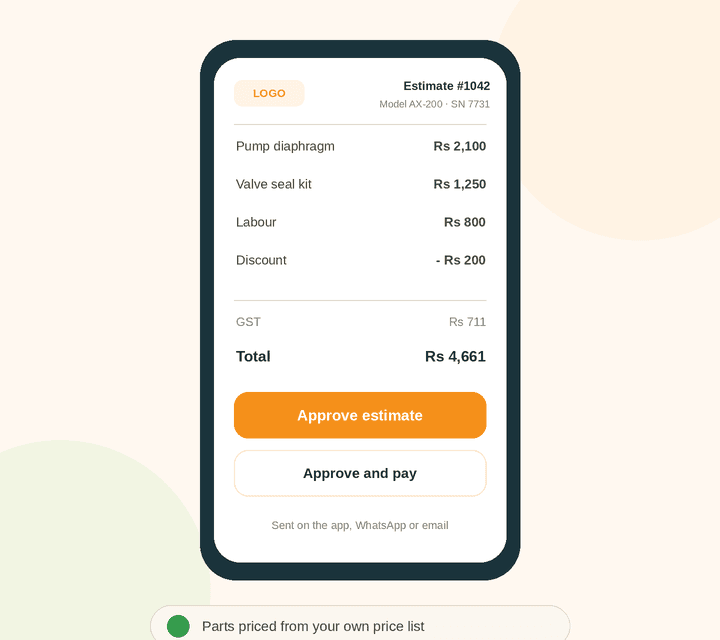
A repair estimate lists each part and the labour with quantity and rate, adds any discount and tax, and ends with a line for the customer's approval. If you are still quoting from a notebook or a message thread, start with a clear format. Here is a free Excel template with a price list, an estimate that picks items from it, and a total that handles discount and GST per line.
| Item | Qty | Rate (₹) | Amount (₹) |
|---|---|---|---|
| Pump | 1 | 850 | 850 |
| Inlet valve | 1 | 120 | 120 |
| Labour (standard repair) | 1 | 300 | 300 |
| Subtotal, before GST | 1,270 |
Example only. Items, rates and totals are invented; GST is added in the template at the rate you set for each line.
A spreadsheet cannot send the estimate to the customer, collect their approval or turn it into an invoice. That is what the rest of this page is about: in Simply C2 the estimate comes from your price list, goes to the customer's app and moves the job to repair when it is approved. For the wider workflow, see service centre management software.
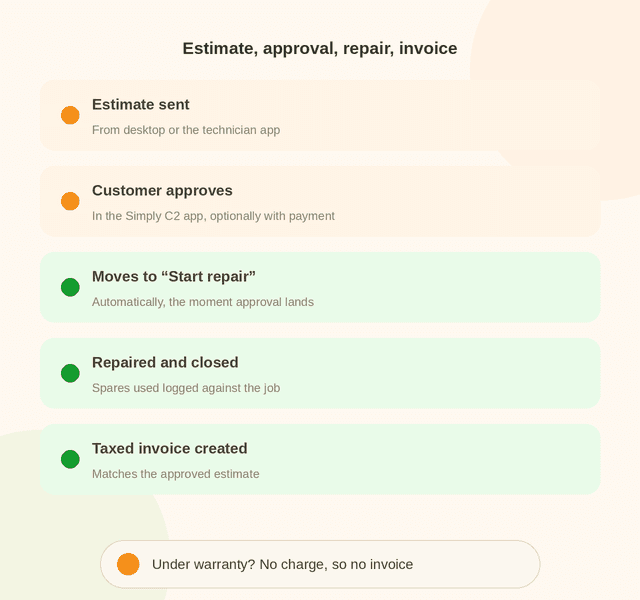
From the desktop or the technician app, on site or at the bench, using a ready template with your logo and address.
In their Simply C2 app, and if you choose, they pay against the estimate straight to your account.
The ticket moves to “Start repair” as soon as approval comes in. No one has to chase it.
When the ticket closes, a taxed invoice is created from the approved estimate.
Store every spare part with its description and price, linked to the right model numbers, so the wrong part can’t be quoted. See spare parts usage tracking.
Raise estimates from the desktop CRM or the technician’s mobile app, with room for your team to apply discounts.
If a repair is under warranty and carries no charge, no invoice is raised. See warranty and AMC tracking.
Estimates, approvals and invoices travel in the app, on WhatsApp or by email, whichever the customer uses.
Let customers pay against the estimate directly to your account, or record payments taken offline. Your choice.
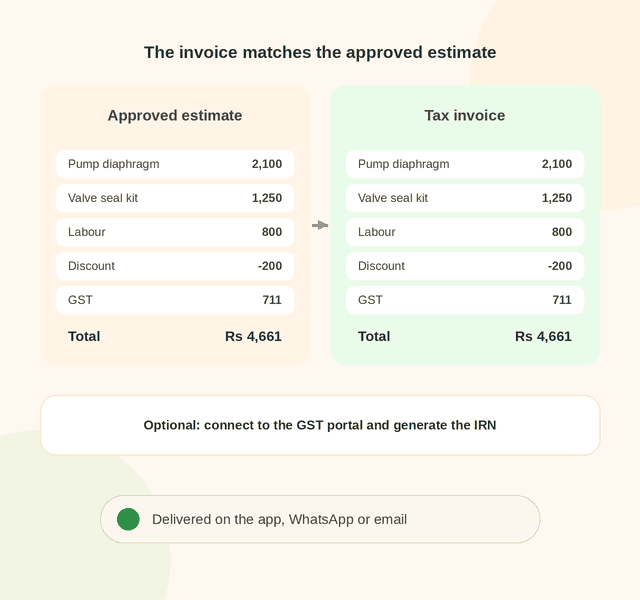
Taxed invoices at closure, with the option to connect to the GST portal and generate the IRN.
No re-typing, no surprises. The invoice carries the same lines, discount and tax as the approved estimate, and goes to the customer on the app, WhatsApp or email.
In the petrol pump deployment, itemized estimates and coverage checks meant no free service by mistake and no unbilled work.
At a water treatment manufacturer’s 10 service centres, with revenue realisation up 35%. Read the case study.
At a 35,000-genset service operation, itemized repair estimates led to transparency and customer trust. Read the case study.
Across ~60 tanker truck depots, drivers received itemized estimates on WhatsApp before any work. Read the case study.
Itemized estimates work the same way whether your technician is at the customer’s site or your service centre. See field service automation and service centre automation, or how it all connects to your customers on the Simply C2 customer service platform.
Technicians raise itemized estimates from the Simply C2 CRM app.

A quote that lists each part, labour charge, discount and tax separately, so the customer can see exactly what they’re paying for before approving the repair.
Yes. Estimates can be raised from the desktop CRM or the technician app, using your price list and template.
Yes. The ticket moves to “Start repair” automatically when the customer approves in the Simply C2 app.
Optionally, yes, for brands with a connected CRM account: customers pay directly to your account. You can also record payments taken offline.
Simply C2 creates taxed invoices when the ticket closes, and can optionally connect to the GST portal to generate the IRN, for brands with a connected CRM account.
Repair estimates and invoicing are on the Premium plan, at ₹500 per user per month, or ₹5,000 per user per year if paid once a year. The Starter plan is free for up to 10 users and covers repair tickets and warranty tracking. See license pricing.
The customer, product, model and serial number; each part and the labour with quantity and rate; any discount; tax; the total; how long the estimate is valid; and a line for the customer’s approval. If the repair is under warranty, say so and show what the customer pays.
Yes. Download it from this page. It has a price list, an estimate that picks items from it, discount and GST per line, and an approval line. It also opens in Google Sheets.
Itemized repair estimates are part of Simply C2 Premium.