

Field service automation on the same Simply C2 CRM, set up for technicians on the move
Simply C2 is field service management software built for Indian service businesses: one CRM that you set up for field service when your technicians go to the customer's site. Territories, auto-assignment, location tracking and scheduled maintenance, on the same product that runs service centres, configured from menus, not rebuilt.
Seven signs your service team has outgrown Excel and WhatsApp groups, and what to move first.
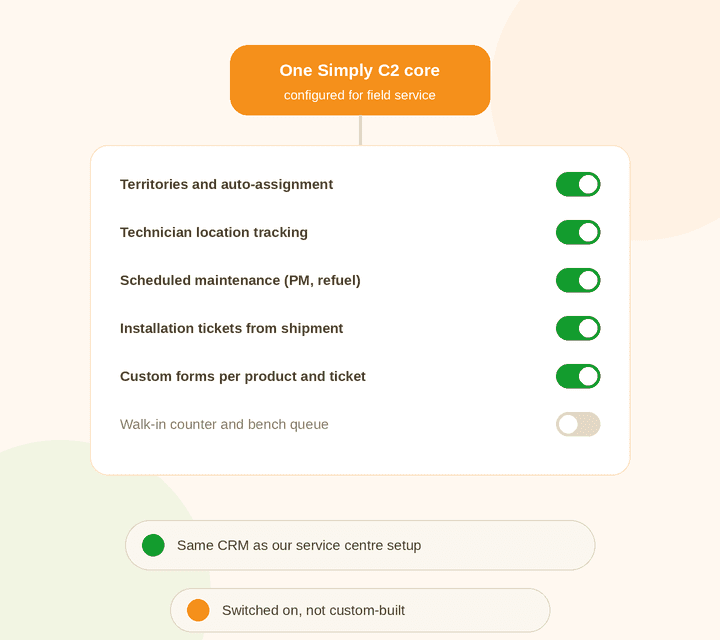
When you set up Simply C2, you choose how you deliver service: in the field, at a service centre. The tickets, customers, equipment records, warranty, estimates, spares and reports are the same underneath.
So if you run field technicians and a repair centre, you don’t need two systems. See service centre automation for the other half, and the Simply C2 customer service platform for how it all connects to your customers.
| Field service setup | Service centre setup | |
|---|---|---|
| Shared core | Tickets, customers, equipment, warranty and AMC, estimates, invoices, spares, reports, customer app | |
| Assignment | By territory | By branch and service manager |
| Switched on | Location tracking, route and site history, PM and refuel schedules | Job intake, bench status, turnaround tracking |
| Key metric | Response time, SLA | Turnaround time |
Simply C2 suits brands with a service network, and the dealers and service teams that work for them, once requests, technicians and contracts are too many to keep in notebooks and chat groups.
It is built around a team of a few dozen technicians, but Starter is free for up to 10 users, so a smaller team can try it on live tickets before deciding. If you also run a repair centre, the same CRM covers it: see service centre automation. If your contracts are the pain point, start with AMC management software.
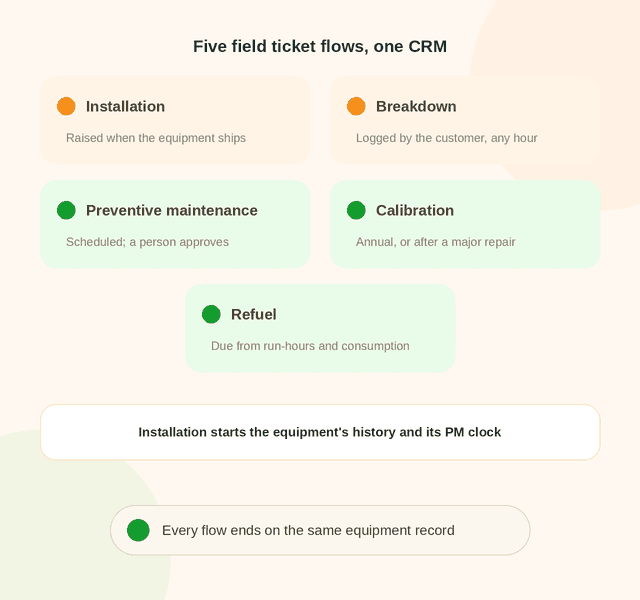
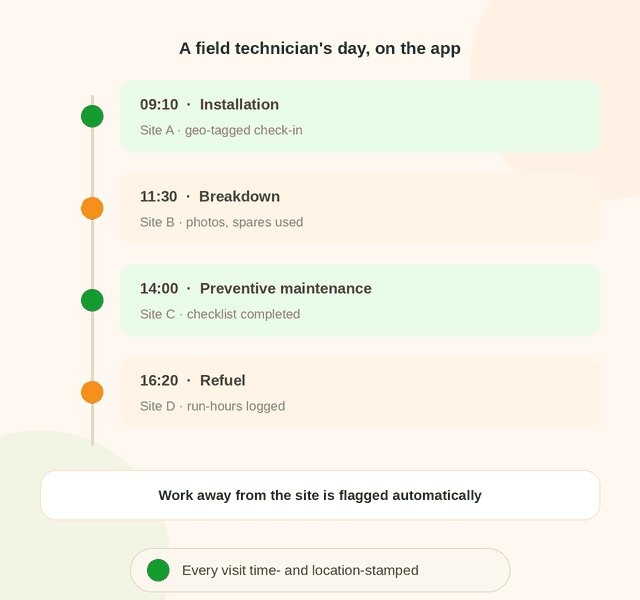
Technicians work from the Simply C2 CRM app: assignments, directions, checklists, photos and spares. Each activity is tagged with time and location, and work done away from the site is flagged.
Managers see where the team is and what’s been done without calling anyone. See field service location tracking.
Tickets go to the technician for that territory as soon as they’re logged, and every ticket’s SLA is tracked.
Design your own data capture forms by product type and ticket type, from your own admin, with no coding.
Parts availability, usage and indent approvals, tied to each ticket, estimate and invoice. See spare parts usage tracking.
Each piece of equipment keeps its installation, repairs, PM and parts on one record, by site. See installed base tracking.
A field service system does more than a help desk. A help desk logs and assigns a request; field service software also has to get a technician to the site, record the work, use the right parts and bill correctly. Eight things to check before you choose, and where Simply C2 stands on each.
What to look for: Tickets should reach the right technician without a phone call.
In Simply C2: Tickets are assigned automatically by territory as soon as they are logged, and every ticket's SLA is tracked. Routine visits come from scheduled maintenance tickets (Premium).
What to look for: Schedules, job details and equipment history in the technician's hand.
In Simply C2: The technician app shows warranty and AMC cover by serial number and works the ticket on site. Estimates and invoicing are on Premium. See the guide to mobile apps for service teams.
What to look for: The history of each customer's equipment, not just a contact list.
In Simply C2: Each piece of equipment keeps its installation, repairs, PM and parts on one record, by site. See installed base tracking.
What to look for: Installation, breakdown and preventive jobs as separate flows, with your own forms.
In Simply C2: Installation, breakdown, PM and refuel tickets, with data capture forms you design by product type and ticket type, with no coding. Customers can log complaints free through the complaints app or on WhatsApp.
What to look for: Parts used should be tied to the ticket, not tracked on the side.
In Simply C2: Parts availability, usage and indent approvals are tied to each ticket, estimate and invoice. Spare parts logistics is on Premium. See spare parts usage tracking.
What to look for: Know where technicians are and when a visit actually happened.
In Simply C2: Technician location tracking is in the free Starter plan, and every visit is time- and location-stamped. See field service location tracking.
What to look for: Numbers on tickets, SLAs and contracts, without building them by hand.
In Simply C2: Advanced reports are on Premium. Alerts and reports on warranty and AMC contracts nearing expiry are part of warranty and AMC tracking.
What to look for: Software that matches your process, and connects to what you already use.
In Simply C2: Forms and ticket types are set up from your own admin. How a field service CRM connects to other systems is covered in the CRM for field service guide.
Repair tickets, warranty and AMC tracking, the installed base, messaging, the technician app and location tracking. Your customers use the complaints app free, and can log complaints on WhatsApp.
Adds preventive maintenance, spare parts logistics, repair estimates, invoicing, two-way WhatsApp messaging and advanced reports. Paying yearly is ₹5,000 instead of ₹6,000 over twelve months. Data migration and onboarding are free for paid customers. See license pricing.
Assignments, directions, checklists, photos, spares and estimates, on the Simply C2 CRM app.

Software that handles the work of sending technicians to customer sites: logging the request, assigning the right technician, scheduling routine visits, tracking the visit, and closing the job with the right records and billing.
No. It’s the same CRM, configured differently. You choose field service, service centre or both during setup; the core records, estimates, spares and reports are shared. See service centre automation.
Yes. Both run on the same CRM, so a customer’s equipment history is complete whether it was fixed on site or at your centre.
Yes. Forms are built by product type and ticket type from your own admin, with no coding.
Yes. Location tracking is part of the free Starter plan, for up to 10 users. Preventive maintenance and spares are on Premium. See license pricing.
A basic account takes about ten minutes to set up yourself. For a team of 20 to 50 technicians, going fully live with your data migrated usually takes one to two weeks.
Starter is free for up to 10 users, with no credit card. Premium is ₹500 per user per month, or ₹5,000 per user per year if paid once a year. Data migration and onboarding are free for paid customers. See license pricing.
Check eight things: scheduling and dispatch, a mobile app technicians will use, customer and equipment records, work orders for every kind of job, spare parts on the job, location tracking, reporting, and how well it fits and connects to your process. The checklist above shows where Simply C2 stands on each.
Yes. Warranty and AMC tracking is part of the free Starter plan. Contracts are recorded against each piece of equipment, with terms by product type and alerts and reports on contracts nearing expiry. See AMC management software.
Start free for up to 10 users, or talk to us about a full rollout.